Last year I learned about Logios, a new OCR (Optical Character Recognition) technology for polytonic Greek, when I read the paper that was published about it here. The paper claimed a high rate of accuracy in transcription, which intrigued me, and I finally decided recently to try my hand at setting it up.
I’ll refrain from getting overly technical here (but this post assumes some familiarity with programming and other such things), and I’ll share the set up I use, which is giving me decent results (less than the accuracy that the paper claimed, but I can’t assume that a real-world scenario is going to be as clean and nice as a training scenario).
NOTE: This will not be a step by step tutorial with perfect instructions for how you can set up your own OCR environment. I will go through the major things that you need and I will supply you with the code that I use, but the rest you will have to handle on your own (or with AI’s help, like I did; I highly recommend AI for assistance in complex configurations like this).
I will be open and honest when I say that I struggled intensely to set up and run Kraken (see here and here) even with Google and the formal documentation and with AI helping me out. Eventually I switched from ChatGPT and Gemini to Claude and it finally got me over the hump to be successfully up and running. NOTE: You will need to install Python and Kraken (I think that there are other libraries that need to be installed, but I don’t recall what they are right now; it will be obvious though when you try to run the code that something is missing, if it is).
My computer runs Windows 11, but it was recommended (I do not remember where) that I run this OCR system on Linux, so I installed WSL and Ubuntuu to fulfil that requirement. Python, its libraries, the code below, etc. all reside on WSL and can be reached from the File Explorer using the following path:
\\wsl.localhost\Ubuntu\home\your_user_name
Below are the files that I wrote using Claude.
If you choose to use these, please read the top portion of the ocr.sh script to understand what it is doing and how it works.
ocr.sh
As I said immediately above, read the Usage and the Options comments in the code below. I talk about the Deskew option in more detail in the next script’s section.
#!/bin/bash# Usage:# ./ocr.sh [-d] /full/path/to/image.jpg /mnt/c/Users/YourUsername/Desktop## Options:# -d Deskew the image before processing (omit if not needed)## The input image can be anywhere, including Windows paths like:# /mnt/c/Users/YourUsername/Desktop/page01.jpg# The output .txt file will be saved to the directory you specify,# named after the image (e.g. page01.txt)# --- Always work from the Kalchas directory ---SCRIPT_DIR="$(cd "$(dirname "$0")" && pwd)"cd "$SCRIPT_DIR"# --- Activate virtual environment ---source ~/greek_ocr/ocr_env/bin/activate# --- Parse options ---DESKEW=falsewhile getopts "d" opt; do case $opt in d) DESKEW=true ;; *) echo "Usage: ./ocr.sh [-d] /path/to/image.jpg /path/to/output/dir"; exit 1 ;; esacdoneshift $((OPTIND - 1))# --- Get positional arguments ---INPUT_IMAGE="$1"OUTPUT_DIR="$2"# --- Validate inputs ---if [ -z "$INPUT_IMAGE" ] || [ -z "$OUTPUT_DIR" ]; then echo "Usage: ./ocr.sh [-d] /path/to/image.jpg /path/to/output/dir" exit 1fiif [ ! -f "$INPUT_IMAGE" ]; then echo "ERROR: Image file '$INPUT_IMAGE' not found." exit 1fiif [ ! -d "$OUTPUT_DIR" ]; then echo "ERROR: Output directory '$OUTPUT_DIR' does not exist." exit 1fi# --- Derive output filename from input image name ---BASENAME=$(basename "$INPUT_IMAGE" | sed 's/\.[^.]*$//')OUTPUT_TXT="$OUTPUT_DIR/${BASENAME}.txt"# --- Step 1: Deskew (optional) ---if [ "$DESKEW" = true ]; then echo ">>> Deskewing $INPUT_IMAGE..." python3 deskew.py "$INPUT_IMAGE" "deskewed.jpg" WORKING_IMAGE="$SCRIPT_DIR/deskewed.jpg"else echo ">>> Skipping deskew." WORKING_IMAGE="$INPUT_IMAGE"fi# --- Step 2: Kraken segmentation ---SEGMENT_JSON="$SCRIPT_DIR/${BASENAME}.json"echo ">>> Running Kraken segmentation on $WORKING_IMAGE..."kraken -i "$WORKING_IMAGE" "$SEGMENT_JSON" segment -blif [ ! -f "$SEGMENT_JSON" ]; then echo "ERROR: Kraken failed to produce $SEGMENT_JSON" exit 1fi# --- Step 3: OCR ---echo ">>> Running Kalchas OCR..."python3 process_page.py "$WORKING_IMAGE" "$SEGMENT_JSON" "$OUTPUT_TXT"echo ""echo ">>> DONE. Transcription saved to: $OUTPUT_TXT"
deskew.py
This script is VERY important, without which I would have abandoned this OCR project entirely.
These images that we are working with are scans from a book, so naturally there will be a degree of “skew” in the page, meaning that the left side of the sentence we are OCRing will be either higher or lower than the right side of the sentence. This creates problems for Logios, not just to read the Greek characters correctly, but also because the skew adds in the top and/or the bottom of the lines immediately above or below the line (to the far left and to the far right) that the OCR software is working with at a given point in time. The addition of characters from the lines immediately above or below are sometimes enough to throw off the OCR and introduce inaccuracies in the transcription.
I do not have a picture before the deskew was done (I am lazy to generate one just to show this), but this is a picture of text after it was deskewed:

You can see that the line is still not perfectly straight, and that there is still SOME of the above line appearing on the left of the image, but the deskew.py script below fixed the line to a sufficient degree that Logios can actually produce a decent transcription of the Greek.
import cv2import numpy as npdef deskew(image_path, output_path="deskewed.jpg"): img = cv2.imread(image_path) if img is None: print(f"ERROR: Could not read image '{image_path}'") return gray = cv2.cvtColor(img, cv2.COLOR_BGR2GRAY) # Detect edges edges = cv2.Canny(gray, 50, 150, apertureSize=3) # Detect lines using Hough transform lines = cv2.HoughLinesP(edges, 1, np.pi/180, 100, minLineLength=100, maxLineGap=10) if lines is None: print("No skew detected. Saving original.") cv2.imwrite(output_path, img) return # Calculate the average angle of detected lines angles = [] for line in lines: x1, y1, x2, y2 = line[0] if x2 - x1 != 0: angle = np.degrees(np.arctan2(y2 - y1, x2 - x1)) # Only consider near-horizontal lines if abs(angle) < 20: angles.append(angle) if not angles: print("No skew detected. Saving original.") cv2.imwrite(output_path, img) return median_angle = np.median(angles) print(f"Detected skew angle: {median_angle:.2f} degrees") # Rotate the image to correct the skew (h, w) = img.shape[:2] center = (w // 2, h // 2) M = cv2.getRotationMatrix2D(center, median_angle, 1.0) rotated = cv2.warpAffine(img, M, (w, h), flags=cv2.INTER_CUBIC, borderMode=cv2.BORDER_REPLICATE) cv2.imwrite(output_path, rotated) print(f"Deskewed image saved to: {output_path}")if __name__ == "__main__": import sys src = sys.argv[1] if len(sys.argv) > 1 else "image.jpg" dst = sys.argv[2] if len(sys.argv) > 2 else "deskewed.jpg" deskew(src, dst)
process_page.py
import jsonimport sysimport osimport torchfrom PIL import Image# --- THE FIX: Force CPU mode ---original_load = torch.loaddef forced_load(*args, **kwargs): kwargs['map_location'] = torch.device('cpu') return original_load(*args, **kwargs)torch.load = forced_load# ------------------------------sys.path.append(os.path.dirname(os.path.abspath(__file__)))try: from kalchas.ocr import load_ocr_model print("Success: Kalchas modules found.")except ImportError as e: print(f"IMPORT ERROR: {e}") sys.exit(1)def process_full_page(image_path, json_path, output_file="transcription.txt"): print("Loading weights...") model = load_ocr_model('Kalchas') if not os.path.exists(image_path): print(f"ERROR: Image '{image_path}' not found.") return if not os.path.exists(json_path): print(f"ERROR: Layout file '{json_path}' not found.") return img = Image.open(image_path).convert('L') with open(json_path, 'r') as f: data = json.load(f) # Debug images always saved inside Kalchas/ocr_debug/ script_dir = os.path.dirname(os.path.abspath(__file__)) debug_dir = os.path.join(script_dir, "ocr_debug") os.makedirs(debug_dir, exist_ok=True) print(f"\n--- PROCESSING: {image_path} ---") with open(output_file, "w", encoding="utf-8") as f_out: for i, line in enumerate(data.get('lines', [])): polygon = line['boundary'] xs, ys = [p[0] for p in polygon], [p[1] for p in polygon] crop_box = (min(xs)-3, min(ys)-3, max(xs)+3, max(ys)+3) line_img = img.crop(crop_box) # Save debug image line_img.save(os.path.join(debug_dir, f"line_{i+1:03d}.png")) text_result = model.ocr([line_img]) if text_result: text = text_result[0] print(f"Line {i+1}: {text}") f_out.write(f"{text}\n") print(f"\n--- SUCCESS! ---") print(f"Transcription saved to: {os.path.abspath(output_file)}")if __name__ == "__main__": img = sys.argv[1] if len(sys.argv) > 1 else "image.jpg" jsn = sys.argv[2] if len(sys.argv) > 2 else "image.json" out = sys.argv[3] if len(sys.argv) > 3 else "transcription.txt" process_full_page(img, jsn, out)
In the WSL/Linux command line, in order to make these three files executable, you will have to run these commands:
chmod +x ocr.shchmod +x deskew.pychmod +x process_page.py
I keep all of the images that I want to OCR in my Windows environment and I use their full path as input parameters when running the ocr.sh script. I also include the full path that I want to transcribed text to be output to:
./ocr.sh -d '/mnt/b/Kalogeras Volumes - Images/Volume 2/image_300dpi_443.jpg' '/mnt/c/Users/antza/Desktop/Zigabenus/Kalogeras Volumes/OCR Texts/Volume 2'
You can write a bash script to include as many of these lines as you want, so you can just run that bash script and walk away while the computer OCRs your files for you.
If you choose to edit the files that reside in WSL from a word processor that runs on Windows proper, you will need to go into WSL and run the following command each time you edit those files, because the carriage returns (I think) are different in Windows than they are in Linux. If you do not run this command, you will get an error when you try to run your program that says either “command not found” or “file not found”.
dos2unix name_of_file_plus_extension
Here is page 341 of Kalogeras’ second volume of his 1887 edition of Euthymius Zigabenus’ commentary (note the slight skew of the scanned page):
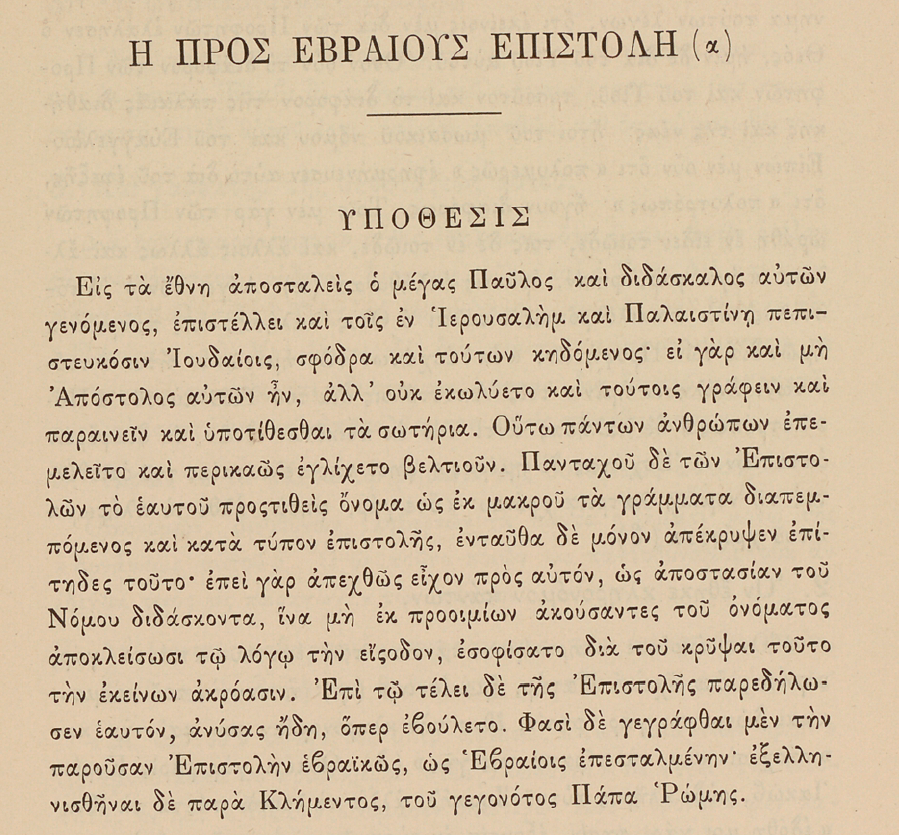
And here is the text that Logios transcribed from the above page:
ΠΡΟΣ ΡΒΡΑΙΟΥ ΕΠΙΣΤΟΔΗ(α
ΥΟΡΣΙΣ
Εἰς τὰ ἔθνη ἀποσταλεὶς ὁ μέγας Παῦλος καὶ διδάσκαλος αὐτῶν
γενόμενος, ἐπιστέλλει καὶ τοῖς ἐν Ἰερουσαλὴμ καὶ Παλαιστίνῃ πεπι-
στευκόσιν Ἰουδαίοις, σφόδρα καὶ τούτων κηδόμενος· εἰ γὰρ καὶ μὴ
Ἀπόστολος αὐτῶν ἦν, ἀλλ’ οὐκ ἐκωλύετο καὶ τούτοις γράφειν καὶ
παραινεῖν καὶ ὑποτίθεσθαι τὰ σωτήρια. Οὕτω πάντων ἀνθρώπων ἐπε-
μελεῖτο καὶ περικαῶς ἐγλίχετο βελτιοῦν. Πανταχοῦ δὲ τῶν Ἐπιστο-
λῶν τὸ ἐκυτοῦ προστιθεὶς ὄνομα ὡς ἐκ μακροῦ τὰ γράμματα διαπεμ-
πόμενος καὶ κατὰ τύπον ἐπιστολῆς, ἐνταῦθα δὲ μόνον ἀπέκρυψεν ἐπί-
τηδες τοῦτο· ἐπεὶ γὰρ ἀπεχθῶς εἶχον πρὸς αὐτόν, ὡς ἀποστασίαν τοῦ
Νόμου διδάσκοντα, ἵνα μὴ ἐκ προοιμίων ἀκούσαντες τοῦ ὀνόματος
ἀποκλείσωσι τῷ λόγῳ τὴν εσοδον, ἐσοφίσατο διὰ τοῦ κρῦψαι τοῦτο
τὴν ἐκείνων ἀκρόασιν. Ἐπὶ τῷ τέλει δὲ τῆς Ἐπιστολῆς παρεδήλω-
σεν ἑαυτόν, ἀνύσας ἤδη, ὅπερ ἐβούλετο. Φασὶ δὲ γεγράφθαι μὲν τὴν
παροῦσαν Ἐπιστολὴν ἐβραικῶς, ὡς Ἐβραίοις ἐπεσταλμένην· ἐξελλη-
νισθῆναι δὲ παρὰ Κλήμεντος, τοῦ γεγονότος Πάπα Ῥώμης.
Logios does not seem to do well, in my experience, with numbers or with capital letters. And it also seems to do better if the page has a large block of text rather than smaller sections of one or two lines separated by lots of white space, but the majority of the commentary is the latter, unfortunately.
But the above transcription is VERY accurate. There are some mistakes, but overall I am very pleased with the final result.
What I started doing during my lunches at work last week is to edit two transcribed pages of Kalogeras’ second volume each day, thereby rendering the Greek fully usable for my own edition. I want to have the Greek and the English facing each other when I eventually (hopefully) publish this thing. Correcting two pages each weekday is a schedule that is slow enough that I think I can stick with it for the foreseeable future and not want to give up on it. It has been enjoyable so far; I think I have transcribed 9 pages so far (I worked on three yesterday, instead of the usual two).
Hopefully this post is useful to at least one person. Again, this was not meant to be a perfect step by step instruction to set up Logios from scratch. It was just a demonstration of how I set it up and of the code that works for me.
If you have any questions about any of this, feel free to ask.


I’d be interested in a comparison with what standard vision-enabled LLMs can do. You mention Claude, ChatGPT, and Gemini. Have you tried transcribing using these chatbots?
LikeLike
I have. I pay for ChatGPT (I pay for Plus, which is about $30 CAD, I think), so I use it once in a while to both OCR and translate some Greek when I need to rapidly work through some things, or compare with my own translation.
The translation is usually less literal than I want, but the OCR is actually really good. I’ve been thinking of OCRing Kalogeras’ 2nd volume with Logios and with ChatGPT and then comparing each transcription, page by page, with WinMerge to see where the differences are and thereby be able to correct the mistakes more quickly.
I wonder how many pages of Kalogeras ChatGPT will be able to OCR before I hit my daily limit… I haven’t hit the limit yet, but I don’t upload too many big files.
And one thing that something like ChatGPT has over Logios is that you can direct it to OCR a page and then to immediately review its own work for errors, which it will do and correct on the fly. I might have to start doing that on my lunches alongside my manual error correction.
LikeLike